Some months ago I posted a script on a SQLServerCentral forum to help a member automating the execution of DBCC CHECKDB and send and e-mail alert in case a consistency error is found.
The original thread can be found here.
I noticed that many people are actually using that script and I also got some useful feedback on the code itself, so I decided to write this post to make an enhanced version available to everyone.
The Problem
Your primary responsibility as a DBA is to safeguard your data with backups. I mean intact backups! Keep in mind that when you back up a corrupt database, you will also restore a corrupt database.
A task that checks the database integrity should be part of your backup strategy and you should be notified immediately when corruption is found.
Unfortunately, the built-in consistency check Maintenance Task does not provide an alerting feature and you have to code it yourself.
The Solution
SQL Server 2000 and above accept the “WITH TABLERESULTS” option for most DBCC commands to output the messages as a result set. Those results can be saved to a table and processed to identify messages generated by corrupt data and raise an alert.
If you don’t know how to discover the resultset definition of DBCC CHECKDB WITH TABLERESULTS, I suggest that you take a look at this post.
Here is the complete code of the stored procedure I am using on my production databases:
Once the stored procedure is ready, you can run it against the desired databases:
EXEC [maint].[dba_runCHECKDB]
	@dbName        = 'model',
	@PHYSICAL_ONLY = 0,
	@allmessages   = 0

Setting up an e-mail alert
In order to receive an e-mail alert, you can use a SQL Agent job and schedule this script to run every night, or whenever you find appropriate.
EXEC [maint].[dba_runCHECKDB]
    @dbName           = NULL,
    @PHYSICAL_ONLY    = 0,
    @allmessages      = 0,
    @dbmail_profile   = 'DBA_profile',
    @dbmail_recipient = 'dba@mycompany.com'
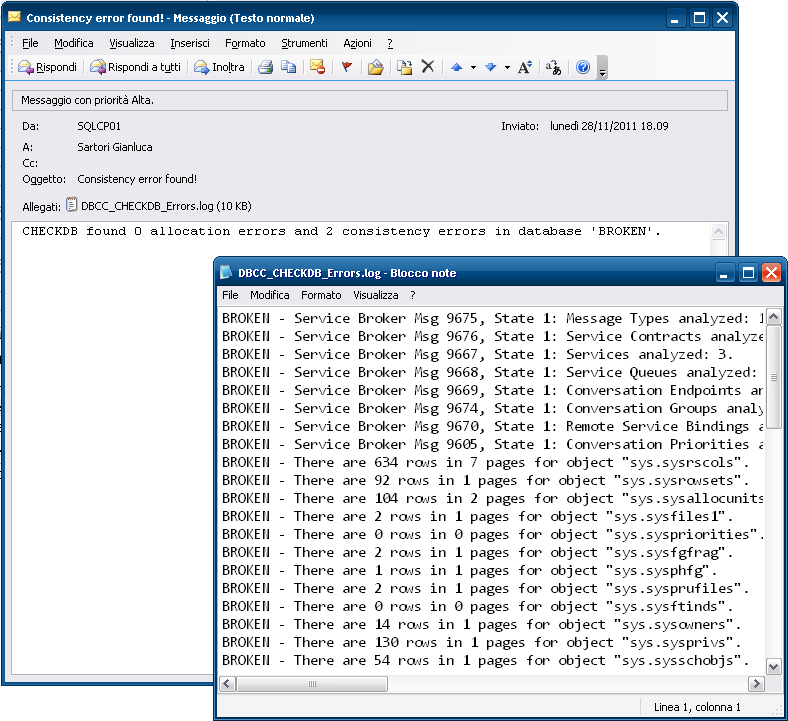
The e-mail message generated by the stored procedure contains the summary outcome and a detailed log, attached as a text file:
Logging to a table
If needed, you can save the output of this procedure to a history table that logs the outcome of DBCC CHECKDB in time:
-- Run the stored procedure with @log_to_table = 1
EXEC TOOLS.maint.dba_runCHECKDB
    @dbName        = NULL,
    @PHYSICAL_ONLY = 0,
    @allMessages   = 0,
    @log_to_table  = 1

-- Query the latest results
SELECT *
FROM (
    SELECT *, RN = ROW_NUMBER()  OVER (PARTITION BY DBId ORDER BY RunDate DESC)
    FROM DBCC_CHECKDB_HISTORY
    WHERE Outcome IS NOT NULL
) AS dbcc_history
WHERE RN = 1
When invoked with the @log_to_table parameter for the first time, the procedure creates a log table that will be used to store the results. Subsequent executions will append to the table.
No excuses!
The web is full of blogs, articles and forums on how to automate DBCC CHECKDB. If your data has any value to you, CHECKDB must be part of your maintenance strategy.
Run! Check the last time you performed a successful CHECKDB on your databases NOW! Was it last year? You may be in big trouble.
Archived WordPress comments (85)
Historical comments from the original site; this archive is read-only.
1) It was only returning the row for the most recent DB, not the most recent for each DB.
2) In the case of one check, the RunDate was not specific enough to get the last/best row.
So here's what I'm doing:
SELECT *
FROM (
SELECT *, RN = ROW_NUMBER() OVER (PARTITION BY DBId ORDER BY RunDate DESC)
FROM DBCC_CHECKDB_HISTORY
WHERE Outcome IS NOT NULL
) AS dbcc_history
WHERE RN = 1
I changed the code to incorporate your suggestions.
Or I am doing something wrong ?
You could also download the code from the "Code Repository".
Cheers,
Gianluca
Any suggestions?
It's a strange error message, as the COMMIT/ROLLBACK commands are placed inside an IF block to handle doomed transactions.
Does any of your databases report DBCC errors?
Can you debug or trace the execution?
What version of SQL Server are you running?
Thanks
Gianluca
Now I fixed it.
Thanks again for reporting!
Thanks again.
I'll be back in a few hours. Sorry for the inconvenience.
Hope this helps
I look forward to reading your results.
Can you post your exact SQLServer version and the exact errors you are getting?
Thanks
I didn't think about that, it makes perfect sense.
I'll update the script as soon as possible.
Now I wonder how to notify all the people that may be using this script that it has to be fixed. I get quite a lot of hits for this post.
I installed the corrupted DB's from sqlskills. The DB's are named DemoFatalCorruption1 and DemoFatalCorruption2. While running the script against #2 the DBCC check errors out with a "A severe error occurred on the current command. The results, if any, should be discarded."
It then does not send an email. Any suggestions?
In this case, you should set up a notification for failed jobs and be notified when the job fails.
Thanks for pointing it out. I will code a fix and post it here.
@dbmail_recipient = 'dba@mycompany.com'
Also, I am using the "broken' db to generate results to be emailed to me but nothing..
I have other job results that are sent to me via email but I can't get yours to work.
I am using a job to send the email like you explained but it seems like I am missing something. Can you explain that section in just a little more detail? Thanks!
My test instances contain the "broken" database from sqlskills and it works for me. I'm using both SQL Server 2008R2 SP2 and SQL Server 2012 SP1.
What version are you using? Are you getting any errors?
You can drop me an email if you want.
My address is spaghettidba AT sqlconsulting.it
The @dbmail_profile that I was using was totally wrong - Here I thought that it meant to use an operator profile - nope it was as easy as using my dbmail profile name and viola...it worked!!!
By the way - the script is cool - and I like that you suggested to create a "Tools" database to be used for maintenance scripts and such...
Again THANKS - cool stuff
Kraig
Shouldn't this procedure with with Database Mail XPs enabled without having to open additional potential security holes?
I'm not sure I understand what you mean with "Turns out that the test command from the Microsoft page doesn’t matter."
I want to make one more suggestion, Its not critical but would be nice to have
in the subject line of email alert, include the server (host) name.
DECLARE @subject varchar(256)
SET @subject = 'Host: '+@@servername+' - Consistency errors found!'
that way if we have more than 1 server (in our case we have about 30 sql servers) in production, then its easy to find out which server has issues.
However I agree it's a sensible improvement and I will try to code it as soon as I can.
"Message
Executed as user: \. The current transaction cannot be committed and cannot support operations that write to the log file. Roll back the transaction. [SQLSTATE 42000] (Error 50000) DBCC execution completed. If DBCC printed error messages, contact your system administrator. [SQLSTATE 01000] (Error 2528). The step failed."
The failure was 29 seconds into the job, which normally takes about 11 minutes to run checkDB on 28 databases. No email was sent. Is the Log file referred to TOOLS.ldf or one of the other DB's log files? I thought there might be a full hard drive but the drive TOOLS.ldf is on has more then 40GB free, and other drives with transaction log files have 100s of GB free.
A few hours later when I got to the office I ran the RunCheckDB command manually and the job completed successfully in the normal time. This morning the job ran successfully as well. What do you make of this?
Msg 156, Level 15, State 1, Procedure dba_runCHECKDB, Line 26
Incorrect syntax near the keyword 'VALUES'.
Is there something that I am doing wrong or was there something that I am missing? Please guide.
Thanks,
Ram.
You're right: the code could not work on 2005 because of the VALUES in the help section. I changed it to use UNION ALL instead. See if it helps and thank you for pointing it out.
Msg 102, Level 15, State 1, Procedure dba_runCHECKDB, Line 184
Incorrect syntax near '<'.
Msg 102, Level 15, State 1, Procedure dba_runCHECKDB, Line 394
Incorrect syntax near '<'.
The code lines are follows respective to the errors:
FROM master.sys.databases
EXEC msdb.dbo.sp_send_dbmail
Can you please let me know what I am doing is wrong?
Thanks,
Ram.
Are there any settings that need to done for the tools database. I just created a blank database called TOOLS and executed the code provided.
Is there a possibility of e-mailing me the code as an attachment in text format?
Thanks,
Ram.
This is a useful script. Out of the box it runs fine. I did run into two issues when trying to either email myself or log the job to a table. I'm using SQL 2008R2 Latin General Bin collation.
For the mail I have updated the stored proc with email profile and recipient (email works fine using the test email feature in sql). I updated the job to use the same profile and recipient. However no email is generated.
For the log once I have configured the stored proc and sql job it fails with "Invalid column name 'RowId'"
Also can you procedure both email and log to a table together?
Appreciate insight.
I'm sorry the script didn't work for you. I just tried to both log to table and send the notification email and it worked flawlessly. I don't know where the error you are seeing comes from.
Regarding the email, you will receive a message only when a consistency error is found. You can change that behaviour in the code if you want.
Regards
Gianluca
Fantastic script and works like a charm for me in SQL Server 2012. However, in SQL Server 2008 R2 I am getting the same issue as Peter D. My collation is SQL_Latin1_General_CP850_BIN2 if you have the opportunity to test. In the 2012 build it is the default collation.
You will see that I replied earlier mentioning that I ran in a particular collation (SQL_Latin1_General_CP850_BIN2) and ran into the same issue as Peter. Please feel free to remove as I have discovered the issue.
@Peter D,
Perhaps you have discovered the same as myself by now --> Some collations are, in fact, CaSe Sensitive.
@Gianluca,
Your script is awesome and to say you need to tighten it up a little bit would be an insult.
@Et al,
For those of you using a non-default collation that run into this issue, please take some time to make sure all the cases are the same. You will see there are a couple items whose case does match the whole script: @RowID and @allMessages do come a couple iterations.
I updated the code and it should work now.
Thanks again!
Please stay us informed like this. Thank you for
sharing.
Thank you for this greate piece of work; it is exactly was I was looking for,
However, I have a couple of issues with the computed column "Outcome" in table ##DBCC_OUTPUT.
First, the expression
MessageText LIKE '%0 allocation errors and' --- etc
is also true for '10 allocation errors' --- etc, or '130 allocation errors' -- etc. Thus it should be
MessageText LIKE '% 0 allocation errors and' --- etc
with a blank between the %-wildcard and the 0.
Second, this is language dependent. If you set the language to german, Outcome will always be 1 because the message returned from DBCC then is
Von CHECKDB wurden 0 Zuordnungsfehler und 0 Konsistenzfehler in der XY-Datenbank gefunden.
Below I propose a solution which works on SQL Server 2010 (version 11.0.5058). I have not tested it on other versions.
With kind regards
Matthias Kläy
Kläy Computing AG
Solve the language dependency issue with the Outcome computed column in table ##DBCC_OUTPUT: Replace the original lines
-- Add a computed column
ALTER TABLE ##DBCC_OUTPUT ADD Outcome AS
CASE
WHEN Error = 8989 AND MessageText LIKE '%0 allocation errors and 0 consistency errors%' THEN 0
WHEN Error 8989 THEN NULL
ELSE 1
END
with the following
-- Add a computed column
Declare @Msg nvarchar(4000)
Declare @MsgLang int
-- First find message language number (LCID) from sys.syslanguages
Select @MsgLang = msglangid From sys.syslanguages Where langid = @@LANGID
-- Next find corresponding text in sys.messages table
Select @Msg = sys.messages.text From sys.messages
Where sys.messages.message_id = 8989
And sys.messages.language_id = @MsgLang
-- Not all languages have an entry in the sys.messages table. In this case, the message is returned in english (LCID = 1033)
If @Msg Is Null Begin
Set @MsgLang = 1033
Select @Msg = sys.messages.text From sys.messages
Where sys.messages.message_id = 8989
And sys.messages.language_id = @MsgLang
End
If @MsgLang = 1033 Begin -- english has different structure of the message
Set @Msg = Replace(@Msg, N'%.*ls', N'CHECKDB')
Set @Msg = Replace(@Msg, N'%d', N'0')
Set @Msg = Replace(@Msg, N'%ls', N'%')
End
Else Begin
Set @Msg = Replace(@Msg, N'%1!', N'CHECKDB')
Set @Msg = Replace(@Msg, N'%2!', N'0')
Set @Msg = Replace(@Msg, N'%3!', N'0')
Set @Msg = Replace(@Msg, N'%4!', N'%')
End
-- The message may contain quotes, thus
Set @Msg = Replace(@Msg, N'''', N'''''')
-- now we have the message string where the database name is replaced by % for the Like-Search
-- everything else must match
Set @sql = N'ALTER TABLE ##DBCC_OUTPUT ADD Outcome AS
CASE
WHEN Error = 8989 AND MessageText LIKE N''' + @Msg + ''' THEN 0
WHEN Error 8989 THEN NULL
ELSE 1
END'
exec (@sql)
DECLARE @language SYSNAME;
just after the other variables' declarations, saving the current language and switching to us_english adding the following code
SELECT @language = @@LANGUAGE;
SET LANGUAGE 'us_english';
just after line #209, which reads
FETCH NEXT FROM c_databases INTO @dbName
and reverting back to the original language by adding
SET LANGUAGE @language
just after line #290, which ends the "WHILE @@FETCH_STATUS = 0" loop.
I also added the extra space before the first 0 while declaring the Outcome column calculation.
Thanks for the script, Gianluca!
I would like to start the procedure for certain bases.
how to do ?
this script does not work:
EXEC TOOLS.maint.dba_runCHECKDB
dbname = basic 1, base2, Base3
PHYSICAL_ONLY = 0,
allMessages = 0,
log_to_table = 1
Thank you
I know when you put a NULL entry in for the @dbName it does all databases on the server - however this is not working for LinkedServers!
So...what I did was do to wrap the SPROC and send each @dbname in the below script:
--All Databases CHECK DBCCDB
DECLARE @databaseList as CURSOR;
DECLARE @databaseName as NVARCHAR(500);
DECLARE @tsql AS NVARCHAR(500);
SET @databaseList = CURSOR LOCAL FORWARD_ONLY STATIC READ_ONLY
FOR
SELECT '[LINKESERVERNAME].dbo.' + QUOTENAME([name])
FROM [LINKEDSERVERNAME].master.sys.databases
WHERE [state] = 0
AND [is_read_only] = 0;
OPEN @databaseList;
FETCH NEXT FROM @databaseList into @databaseName;
WHILE @@FETCH_STATUS = 0
BEGIN
EXEC [tools].[maint].[dba_runCHECKDB]
@dbName = @databaseName,
@PHYSICAL_ONLY = 0,
@allmessages = 0,
@log_to_table = 1
FETCH NEXT FROM @databaseList into @databaseName;
END
CLOSE @databaseList;
DEALLOCATE @databaseList;
-- Query the latest results
SELECT * FROM (
SELECT *, RN = ROW_NUMBER() OVER (PARTITION BY DBId ORDER BY RunDate DESC)
FROM [tools].[maint].[DBCC_CHECKDB_HISTORY]
WHERE Outcome IS NOT NULL
) AS dbcc_history
WHERE RN = 1
This works - but only on the first database that it returns!
The message I get back for all the other databases on the LinkedServer is:
"No database matches the name specified"
A debug is showing that the @dbname is working - but it errors on the ##DBCC
Are you able to help in getting this to work with LinkedServers?
Thanks
Hope this helps
My idea was to create a Maintenance Instance from a SQL Server Standard instillation and create LinkedServers from that Instance to create a Maintenance Plan against them and for it to iterate through each LinkedServer to run the maintenance. Single SQL Agent to then provide the dbmail alerts if failed/error.
Without setting up Scheduled Tasks to execute the code on each SQL Express server I am a little stuck for ideas as to how to complete some maintenance scripts without losing hours doing it manually each day!
first thanks for that great script! 8)
It works fine on most of our SQL servers, but on some i didn`t get a email.
We have about 20 MS SQL express servers,in all versions from 2005 to 2014.
Sending a test email with EXEC msdb.dbo.sp_send_dbmail works fine, but the script dosen`t send a email on some servers.
If i run the script on a cmd with sqlcmd, the output is diffrent.
On servers that send a mail, it`s like this:
CHECKDB found 0 allocation errors and 0 consistency errors in database 'XY'
On servers that dosen`t send a mail, it`s like this:
DBCC execution completed. If DBCC printed error messages, contact your system administrator
Any suggestions?
Regards
Rouven
Msg 50000, Level 16, State 1, Procedure dba_runCHECKDB, Line 437 [Batch Start Line 33]
The current transaction cannot be committed and cannot support operations that write to the log file. Roll back the transaction.
Removed XACT_ABORT then received the emailed error
Unable to run DBCC on database [databasename]: Check statement aborted. The database could not be checked as a database snapshot could not be created and the database or table could not be locked.
When I try to create a db snapshot manually:
CREATE DATABASE dbname_dbss1800 ON
( NAME = dbname, FILENAME =
'N:\test\dbname_data_1800.ss' )
AS SNAPSHOT OF dbname;
GO
DROP DATABASE dbname_dbss180
I get error
CREATE FILE encountered operating system error 5(Access is denied.)
After granting Network Service (account sql server runs under as default) modify permission to the database data file location, this is resolved.