Yesterday I upgraded my laptop to Windows 8.1 and everything seemed to have gone smoothly.
I really like the improvements in Windows 8.1 and I think they’re worth the hassle of an upgrade if you’re still on Windows 8.
As I was saying, everything seemed to upgrade smoothly. Unfortunately, today I found out that SQL Server services were gone.
My configuration manager looked like this:
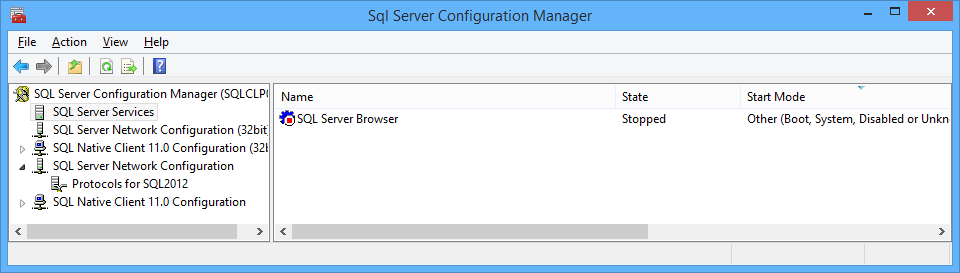
My laptop had an instance of SQL Server 2012 SP1 Developer Edition and the windows upgrade process had deleted all SQL Server services but SQL Server Browser.
I thought that a repair would fix the issue, so I took out my SQL Server iso and ran the setup.
Unfortunately, during the repair process, something went wrong and it complained multiple times about “no mappings between Security IDs and account names” or something similar.
Anyway, the setup completed and the services were back in place, but were totally misconfigured.

SQL Server agent had start mode “disabled” and the service account had been changed to “localsystem” (go figure…)
After changing start mode and service accounts, everything were back to normal.
I hope this post helps others that are facing the same issue.
Archived WordPress comments (5)
Historical comments from the original site; this archive is read-only.
Fortunately I found a shorter resolution path than last time: Looking in C:\windows\SysWOW64\ I found a number of SQLServerManagerXX.msc files - right-click > Pin to Start provides me access to the missing config manager (albeit with an unfriendly name...)